Paprika Recipe Manager 3
- 4.9
- Rating
- 500.00K
- Installs
- Free
- Price

 Analysis by App-foxy
I like recipe apps that stay out of the way, and Paprika Recipe Manager 3 fits that preference better than most. It is a food and drink app from Hindsight Labs LLC built around keeping recipes organized rather than turning cooking into a social feed, shopping channel, or stream of distractions. After spending time with it, I found its main appeal in the small decisions it makes easier: finding a recipe again, keeping ingredients together, and moving from a saved idea to an actual meal without searching through browser tabs.
The app is free to download, carries an Everyone age rating, and has earned a 4.9 average from around 20 thousand ratings. More than 500 thousand people have installed it, which gives it a reassuring sense of maturity without making it feel crowded. The current release is version 3.3.10, and it works on Android 5.0 or later. There are also in-app purchases ranging from $4.99 to $14.99 per item, so I would check the available purchase options inside the app before assuming every function follows the same free model.
How Paprika turns scattered recipes into a usable cooking system
The first thing I noticed is that Paprika is less about discovering endless new dishes and more about building a dependable personal cookbook. That distinction matters. If you want a stream of trending meals, short cooking videos, or a social space where people post dinner photos, this is not trying to compete in that lane. Its strength is giving saved recipes a home where they can be revisited, adjusted, and used in ordinary weekly cooking.
You May Also Like

 Blood Strike: 2.5 Anniversary
Blood Strike’s Loadouts Turn Every Drop Into a Tactical Gamble
A close look at Blood Strike’s custom loadouts: how fast access to signature weapons reshapes its battle royale rhythm, rewards preparation, and narrows the gap between fights.

 Pandora - Music & Podcasts
Pandora’s Music Is Easy to Start, but Harder to Recover
Pandora’s strength is its low-effort path from a seed to a station. Its weak spot is how much confidence it asks you to place in connection, setup, and quiet recovery.

 8 Ball Pool
 Is Built on Rivalries, Rematches, and Routine
A close look at the rivalries, rematches, shared routines, and unanswered safety questions that turn a quick pool match into a persistent mobile community.

 Samsung Music
’s Quiet Strength Is Playing What You Already Own
Its reach comes less from spectacle than from dependable access to a personal library. That simplicity is both the app’s strongest retention engine and its ceiling.

 AccuWeather: Weather Radar
AccuWeather Review: A Quick, Clear Forecast for Everyday Decisions
For everyday plans, the best forecast is the one you can understand quickly. AccuWeather makes rain timing, radar, and local conditions easy to act on, with a few trade-offs.

 Hill Climb Racing
Why Hill Climb Racing Still Turns Crashes Into One More Run
A tiny car, a bumpy hill and one more upgrade: Hill Climb Racing keeps resurfacing because its simple chaos makes every near-miss feel personal.
More From Our News Desk
View All News


That makes it particularly useful for people who already collect recipes in messy ways. I have saved recipes in browser bookmarks, copied ingredients into notes, taken screenshots, and then forgotten where any of them went. A dedicated recipe manager solves a different problem from a search engine: it reduces the distance between “this looks good” and “I can cook this tonight.” Paprika’s simple approach is valuable because it treats organization as part of the cooking process.
When I use an app like this, I care less about a flashy opening screen than about what happens after a recipe has been saved. Can I recognize it quickly? Can I read the ingredients without hunting through paragraphs? Can I make a small change without rewriting everything? Can I use the same recipe again next month? Those are the practical tests that decide whether a recipe manager becomes a habit or gets abandoned.
Saving recipes is only useful when cleanup is quick
The most important workflow is the transition from a recipe found elsewhere to a recipe that feels like yours. Imported recipes often contain clutter: long introductions, repeated ingredient notes, strange formatting, or instructions that assume a particular brand of product. I recommend treating the first save as an editing pass rather than a final archive. Rename the recipe clearly, remove unnecessary text, and correct quantities while you still remember why you saved it.
This is one of the less obvious strengths of a dedicated manager. A browser bookmark preserves a page, but it does not necessarily preserve a clean cooking reference. A note-taking app gives you flexibility, yet you have to design the structure yourself. Paprika sits between those choices: it is more organized than a general note and less dependent on remembering which website held the original recipe.
My practical tip is to use consistent names for recipes that you make repeatedly. “Chicken soup” is easy to find, but “Chicken soup — weeknight” or “Chicken soup — freezer batch” tells you more when you are tired and standing in the kitchen. The app becomes much more useful when your own naming habits make the collection searchable in your head as well as on screen.
Planning works best when recipes are treated as building blocks
A recipe manager becomes more valuable when it supports decisions beyond a single meal. I found it helpful to think in groups: fast dinners, dishes that use the same vegetables, recipes suitable for guests, and meals I would actually cook after work. This is more realistic than collecting recipes based only on how attractive they look. A beautiful weekend project can remain untouched for months, while a plain one-pan meal earns its place through repetition.
For a busy weekday, my workflow would be simple. I would choose a main dish, check the ingredient list before leaving for the store, and then open the recipe again while cooking. That sounds ordinary, but it removes several small points of friction. I do not have to switch between a search page and a separate note, and I am less likely to buy an ingredient twice because the recipe and my planning process are separated.
There is also a useful trade-off here. A personal collection can become too large to trust if everything is saved without review. I would rather keep a smaller set of recipes I might genuinely cook than fill the app with every interesting page I encounter. A recipe manager cannot decide which dishes fit your time, equipment, budget, or skill level. Its value increases when you make those decisions deliberately.
What changes when the network is part of the cooking routine
Connectivity matters most at the moment a recipe is being found or brought into the collection. If I am browsing for dinner ideas, the experience naturally depends on the source I am using and the connection available at that moment. A slow network can make discovery feel frustrating before Paprika has even become the useful part of the process. I would avoid leaving recipe collection until I am already in a hurry at the supermarket or halfway through cooking.
My preferred routine is to prepare the collection earlier. When I have time, I find recipes, organize them, and check the ingredient details before the meal becomes urgent. That separates discovery from execution. It also exposes problems early, such as an unclear instruction or an ingredient that is difficult to find locally. The app then functions as a prepared reference instead of a last-minute rescue tool.
I would not judge the app solely by how quickly it helps me find something new. Its more lasting role is what happens after a recipe enters my personal library. The less often I need to revisit the original search page, the more the app earns its place. That is especially relevant for cooks who repeat family meals, adapt recipes over time, or keep a rotation of dependable dishes.
Using it on a phone in real kitchens
A phone is a natural place for a recipe, but kitchens are not always friendly environments for phones. Screens get dim, hands get messy, and attention is divided between reading and preparing food. I found that the app is most comfortable when I do a short preparation step before cooking: read the full recipe once, identify the stages, and make sure the ingredients are ready. That reduces the need to keep touching the screen every few seconds.
For a recipe with several separate components, I would also rewrite my mental plan into a sequence before starting. For example, I might prepare a sauce while something roasts, then return to the recipe for the finishing step. This is not a feature claim; it is a way to use a recipe manager more intelligently. The app can hold the instructions, but the cook still needs to translate them into the timing of a real kitchen.
The mobile format is especially convenient for shopping. I can check a recipe while comparing ingredients, notice that a pantry staple is missing, and avoid relying on memory. The limitation is that a phone-based list still requires attention. If you are shopping for several meals, a single recipe at a time may not be enough for a complete grocery plan unless you deliberately combine the ingredients yourself.
That is where a general notes app may suit some people better. If your priority is a flexible master shopping list shared across a household, a notes or grocery app could be more direct. Paprika is the better fit when the shopping decision needs to stay connected to the recipe itself. I would choose it for recipe-centered planning, not as a replacement for every kind of household organization.
What happens when a recipe or connection does not behave
Recipe workflows often fail in mundane ways. A webpage may change, an ingredient may be described differently from what you expected, or an imported recipe may need correction. The important habit is not to assume that the first saved version is perfect. I would review quantities, serving information, and instructions before depending on a recipe for guests or an expensive shop.
Connectivity adds another point of uncertainty during discovery. If a page does not load properly or a recipe is difficult to retrieve at the moment I need it, that is a good reason to prepare important meals in advance rather than depend on a live search in the kitchen. I prefer to open the recipe before cooking and make sure the version I intend to use is clear. This is a small habit, but it prevents the most annoying kind of failure: discovering a problem after ingredients are already on the counter.
Recovery is easier when the collection is maintained as a working cookbook rather than a storage box. If I notice that a recipe needs less salt, a different pan, or an extra step, I want to record that while the result is fresh. Otherwise I repeat the same mistake next time. The app’s real long-term advantage is not merely storing the original recipe; it is giving me a place to preserve my own corrections.
There is a limit to this approach. If you want a fully automated system that understands every substitution, scales every dish perfectly, and handles every shopping decision without review, a simple recipe manager may feel manual. I see that manual work as a reasonable trade-off for control, but it will not appeal to everyone. Cooks who prefer highly guided, step-by-step instruction may be happier with a more instructional cooking platform.
Using the app without wasting data or attention
I am careful about data use when an app is connected to recipe browsing, because food content can encourage endless scrolling. Paprika is easier to use responsibly when I treat it as a library rather than a feed. I would collect a few promising recipes, clean them up, and close the discovery loop. That keeps both network activity and attention focused on meals I may actually prepare.
A useful low-data habit is to organize recipes when connected reliably, then avoid making the cooking moment depend on repeated browsing. I would also avoid saving multiple copies of the same recipe from different pages. Duplicates make a collection look larger while making future choices harder. Keeping one trusted version, with personal notes or adjustments, is more efficient than maintaining several nearly identical entries.
Privacy-conscious users may also appreciate the distinction between a recipe library and a social platform. The app’s purpose is personal organization, not public posting. Still, I would review the app’s current permissions and purchase screens on my own device before installing or upgrading, especially because mobile policies and account requirements can change. That is sensible practice for any app that becomes a long-term home for personal information.
The in-app purchase range means the free starting point should be approached as an opportunity to test the workflow, not as a promise that every advanced need will remain free. I would first decide whether the organization style suits me, then consider whether a paid item is worthwhile for the way I cook. Someone who only saves a recipe occasionally may not need more than a basic tool, while a person building a serious personal cookbook may find the investment easier to justify.
Who will get the most from Paprika
I would recommend Paprika Recipe Manager 3 to home cooks who repeatedly lose recipes, people who cook from a personal rotation, and anyone trying to turn scattered online discoveries into a dependable cookbook. It is also a good match for cooks who like to adjust recipes over time rather than follow a fixed page forever. The app rewards organization, but it does not require professional cooking knowledge.
It is less suitable for someone whose main goal is entertainment or social discovery. If you want videos, community comments, live inspiration, or a large emphasis on visual browsing, another food app may feel more lively. It may also be the wrong choice if you want a grocery-first tool that automatically manages an entire household’s shopping process. Paprika’s center of gravity is the recipe, and that focus is both its identity and its boundary.
The app is also not a substitute for judgment in the kitchen. It can keep instructions accessible, but it cannot tell whether your oven runs hot, whether a vegetable is unusually large, or whether a sauce needs more time. I like that it does not pretend to remove those decisions. For me, the best recipe tool is one that reduces clerical work while leaving room for the cook’s experience.
My connectivity verdict
After using Paprika as a recipe organizer, I see connectivity as most important before cooking rather than during it. The discovery and collection stages benefit from a reliable connection, while the actual meal is better when the recipe has already been checked and prepared for use. That distinction makes the app feel calmer than a browsing-heavy alternative, provided I do not wait until the last minute to assemble my plan.
Its strongest quality is consistency. Hindsight Labs LLC has kept the concept focused: save useful recipes, organize them around real cooking habits, and return to them without the clutter of a general browser or note-taking app. The 4.9 average and broad adoption suggest that this focused approach resonates with many users, but my recommendation is still conditional. You need to enjoy maintaining your own collection for the app to reach its full value.
My bottom line: Paprika Recipe Manager 3 is best when you want a personal cooking reference, not a food-content playground. I would install it if my recipes were scattered across websites and screenshots, and I would spend a little time cleaning the collection so it remained useful. I would skip it in favor of a discovery-led or grocery-led alternative if organization is not the problem I am trying to solve. For cooks who want fewer searches, fewer repeated mistakes, and a more intentional path from recipe idea to dinner, it is a thoughtful and practical choice.
FAQs for Paprika Recipe Manager 3
01What is Paprika Recipe Manager 3 and what features does it offer?
Paprika Recipe Manager 3 is a comprehensive app designed to help users organize their recipes, meal plans, and shopping lists. The app allows you to save recipes from any website, create meal plans, and generate grocery lists. It also features a pantry management system to keep track of your ingredients, ensuring efficient meal preparation.
02Can I use Paprika Recipe Manager 3 offline?
Yes, Paprika Recipe Manager 3 is fully functional offline. Once you have downloaded your recipes and set up your lists, you can access and modify them without an internet connection. This makes it convenient for users who need to cook or shop in areas with limited internet access.
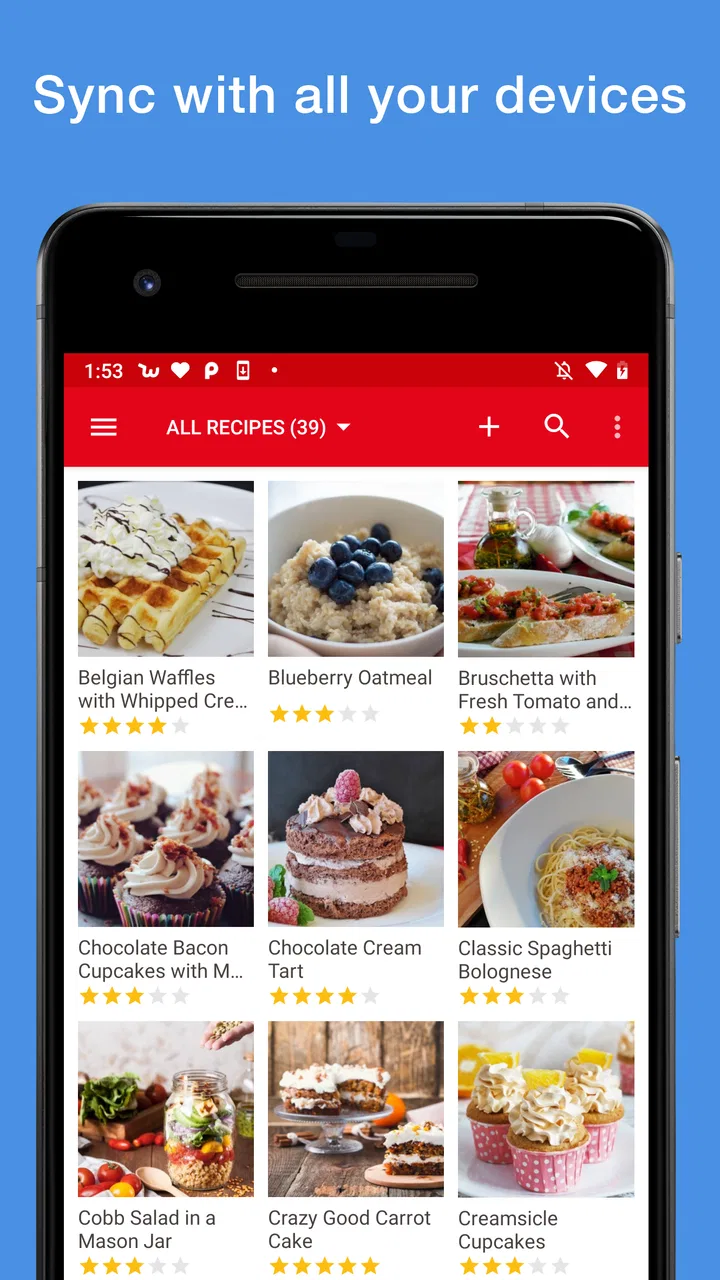
03Is it possible to sync my recipes and data across multiple devices?
Absolutely. Paprika Recipe Manager 3 offers cloud syncing, allowing you to access your recipes, meal plans, and shopping lists across multiple devices. This feature ensures that your data is always up-to-date, whether you're using a smartphone, tablet, or computer.
04Does Paprika Recipe Manager 3 support importing recipes from other apps?
Yes, Paprika Recipe Manager 3 supports importing recipes from other platforms. You can easily import recipes from various apps or websites using the built-in browser or by pasting the URL. This feature ensures a seamless transition if you're migrating from another recipe management app.
05What are the pros and cons of using Paprika Recipe Manager 3?
Pros of Paprika Recipe Manager 3 include its intuitive interface, robust syncing capabilities, and offline functionality. It also offers extensive organizational tools and pantry management. The cons may include the lack of a free version and the initial learning curve for new users unfamiliar with recipe management apps.
Pros
- Intuitive interface enhances user experience.
- Cross-platform sync keeps recipes updated.
- Smart grocery list simplifies shopping.
- Meal planner aids in organized cooking.
- Import recipes directly from websites.
Cons
- No free version; requires purchase.
- Limited customization of meal plans.
- No offline access for all features.
- Occasional sync issues reported.
- Requires manual entry for some recipes.

Paprika Recipe Manager 3
Gallery